Unit-less CSS line-height
I recently learned that it’s very practical to use a unit-less number to specify the CSS line-height. Unlike using a unit – like em, for example – this will make the line-height dependent on the text’s font-size, instead of being an absolute value.
Here’s a little example.
The markup (excerpt):
<body>
  Lorem ipsum dolor sit amet, consectetur adipiscing elit, sed do eiusmod tempor incididunt ut labore et dolore magna aliqua.

  <p>
    Lorem ipsum dolor sit amet, consectetur adipiscing elit, sed do eiusmod tempor incididunt ut labore et dolore magna aliqua.
  </p>

  <blockquote>
    Lorem ipsum dolor sit amet, consectetur adipiscing elit, sed do eiusmod tempor incididunt ut labore et dolore magna aliqua.
  </blockquote>
</body>
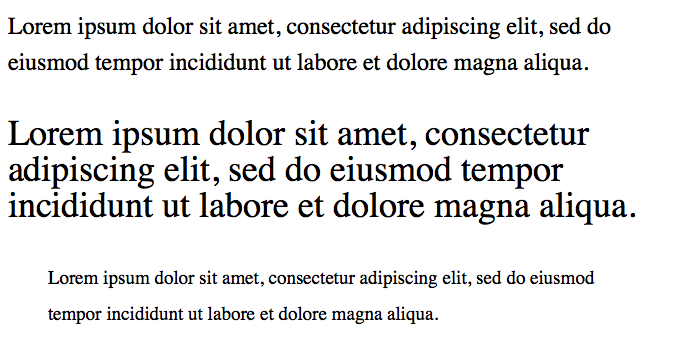
And here’s the CSS with unit, and the corresponding screenshot:
body {
  font-size: 1.5em; // 24px
  line-height: 1.5em; // 36px
}
p          { font-size: 1.5em; } // 36px, line-height still at 36px
blockquote { font-size: 0.8em; } // 19.2px, line-height still at 36px
And here’s the CSS without unit. This looks far more balanced:
body {
  font-size: 1.5em; // 24px
  line-height: 1.5; // 36px
}
p          { font-size: 1.5em; } // 36px,   line-height: 54px
blockquote { font-size: 0.8em; } // 19.2px, line-height: 28px
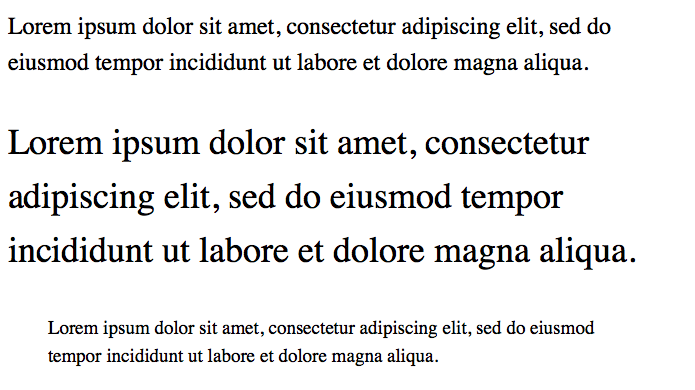
Using a unit-less number seems to be a better default, because the text generally looks better when its line height is based on its font size. I seem to need less line-height statements in total and the typography looks generally more appealing.