SSD upgrade: done
I went with option 1: installing a Samsung 250 GB EVO SSD in place of my existing 500 GB HDD and replacing the DVD-drive with the Hardwrk-Kit plus the 500 GB HDD.
Feedback from a few people helped me making the decision. All of them are running a similar setup — or pretty much the same even. All of them are very happy with it and haven’t had any problems.
Here’s what the storage allocation now looks like:
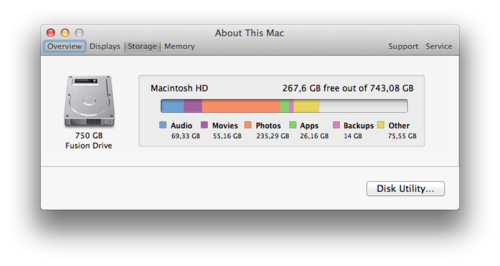
And here are the steps I’ve taken:
- Making sure that the drive containing my Time Machine backups is working normally and data is readable.
- Backing up the most important data on an additional HDD. Just in case. (I also had a third backup: at Backblaze.)
- Creating a Mavericks installer drive. Verifying that I can actually boot from it.
- Installing the new hardware, following these manuals: hardwrk | Installation manual, MacBook Pro 15" Unibody Early 2011 Hard Drive Replacement, Installing MacBook Pro 15" Unibody Early 2011 Dual Hard Drive.
- Booting from the Mavericks installer drive, formatting the disks and setting them up as one Fusion Drive.
- Restoring Mavericks from my Time Machine backup.
The disassembling and reassembling of the hardware turned out to be easy. The manuals are very detailed and the hardware is laid out pretty obviously anyway.
I’ve used the setup for a day now, and everything’s running smoothly and really fast. Happy, happy, joy, joy.