I only found out once I switched to an English keyboard layout that macOS has a useful and intuitive shortcut to toggle through windows of the current foreground app: ⌘` (CMD-backtick).
This makes perfect sense on an English layout, because the backtick key is right above the Tab key. And so it’s a very similar shortcut as CMD-Tab, which toggles between windows of all currently open apps.
On a German keyboard layout, it’s the same shortcut by default: CMD-backtick. This makes no sense at all, because the backtick is next to the backspace and requires the Shift-key modifier, too.
Of course I was missing this handy shortcut once I switched back to a German layout again. And so I remapped ⌘` to ⌘^ to keep my muscle memory working for switching windows. Because the ^-key on a German layout has the same position as the ` on an English one.
It’s never been easier to live and work as a nomad. Traveling is cheaper, more productive, and more inspiring than staying at home. Working in an office is a relic of the past.
SelfControl is a free and open-source application for Mac OS X (10.5 or above) that lets you block your own access to distracting websites, your mail servers, or anything else on the Internet. Just set a period of time to block for, add sites to your blacklist, and click “Start.” Until that timer expires, you will be unable to access those sites–even if you restart your computer or delete the application.
I went with option 1: installing a Samsung 250 GB EVO SSD in place of my existing 500 GB HDD and replacing the DVD-drive with the Hardwrk-Kit plus the 500 GB HDD.
Feedback from a few people helped me making the decision. All of them are running a similar setup — or pretty much the same even. All of them are very happy with it and haven’t had any problems.
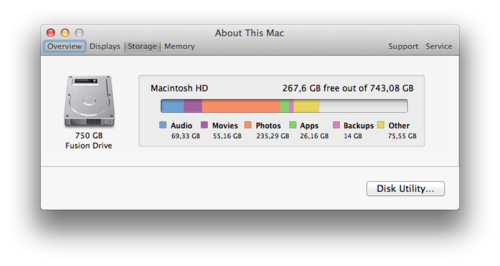
Here’s what the storage allocation now looks like:
And here are the steps I’ve taken:
Making sure that the drive containing my Time Machine backups is working normally and data is readable.
Backing up the most important data on an additional HDD. Just in case. (I also had a third backup: at Backblaze.)
The disassembling and reassembling of the hardware turned out to be easy. The manuals are very detailed and the hardware is laid out pretty obviously anyway.
I’ve used the setup for a day now, and everything’s running smoothly and really fast. Happy, happy, joy, joy.
I’ve been using Firefox as my main browser for the last couple of months. And only now I discovered a feature called “Tab Groups”:
Tab Groups are an easy way to organize a lot of tabs. With Tab Groups, you can visually group related tabs, switch between groups and quickly search through all of your tabs.
If you’re a tab addict, regularly ending up with more tabs than fit on the Tab Strip, Tab Groups were made for you. They’re also great for grouping tabs by task and then switching between them.
That very much sounds like me. What a nice feature!
I’m planning to upgrade my 2011 15” MacBook Pro’s hard drive with an SSD. Currently I’m still running on a 5400rpm 500 GB HDD. When I ordered the Mac two years ago, I intentionally went with the cheapest HDD option – this one – with the plan to upgrade it with an SSD setup 1.5–2 years later when SSD prices have come down. It’s now 2.5 years later and I’m finally looking at some options.
The current situation
I’m primarily looking for the performance increase in the upgrade. But I’m also going to run out of HDD space fairly soon, and it would be nice to still be able to fit all my data on that one machine after the upgrade.
Out of the 500 GB I currently have, most of it is occupied by my photos and movies in the Aperture library. The library is currently taking up 275 GB. I would only need fast access to the more recent photos – not further back than one year. The rest is merely an archive.
My iTunes library is another 55 GB that doesn’t need SSD-grade speed.
So most of these files could live on a/the good old spinning hard drive without a problem. But I’d definitly want to keep my music available on the MacBook’s internal hard drive. I need my music with me at all times.
Here’s what my current storage allocation looks like:
The options
To keep all my data on the MacBook, I’d have to increase the disk space to at least 750 GB. I think this amount would easily last me for the next few years.
Here are the options I am considering, ordered from cheapest to most expensive:
(A fifth option would be to get a 500 GB SSD and the Hardwrk Kit to have a 1TB Fusion Drive internally. But price-wise this is pretty close to option 4, which I would chose over this option anyway.)
The most affordable solution. The Hardwrk Kit replaces the DVD drive with an adapter that can house another drive – HDD or SSD. It also comes with a enclosure for the DVD drive, so you can still use the drive via USB.
I don’t care much for having a DVD drive internally. So making that external via the Hardwrk Kit is perfectly acceptable to me. The only downside would be, that I’d need to take that component apart as well.
Costs: ~ 230 EUR (150 EUR for the SSD, 80 EUR for the Hardwrk Kit)
Disk space: 750 GB, all internally.
Pros: Affordable, enough space, good to great performance increase, good use of existing HDD.
Cons: Performance not as good as a pure SSD setup, more effort installing since I need to replace the DVD drive.
Option 2
The same setup as option 1, but with a more performant SSD.
Costs: ~ 280 EUR (200 EUR for the SSD, 80 EUR for the Hardwrk Kit)
Disk Space: 750 GB, all internally.
Pros: Quite affordable, enough space, good to great performance increase, good use of existing HDD.
Cons: Performance not as good as a pure SSD setup, more effort installing since I need to replace the DVD drive. Not quite as affordable as option 1.
Option 3
Internally, a pure SSD setup. The existing HDD would be put in an external USB enclosure to hold additional data.
Costs: ~ 300 EUR for the SSD.
Disk space: 1 TB, 500 GB internally on the SSD, 500 GB externally on the HDD.
Pros: Great performance increase, price ok, somewhat good use of existing HDD, no messing with the DVD bay.
Cons: Not all data on the MacBook. I would need to start manually relocating parts of the Aperture library onto the external drive and keep managing this.
Option 4
The most expensive option, but certainly the one I’d prefer, if I left costs out of the equation.
Costs: ~ 410 EUR for the SSD.
Disk space: 750 GB SSD-only storage, all internally.
Pros: Great performance increase. Enough space for all my data on the SSD, no messing with the DVD drive bay.
Cons: Expensive, no really good use of the existing HDD.
Decisions, decisions
Option 4 would certainly be the best one performance- and convenience-wise. Also, it might be the most future-proof and least error-prone solution. But is it really necessary to have all my data on an SSD at all times?
FusionDrive seems to work quite nicely and options 1 and 2 would give me the necessary speed plus big storage capacity without having to manage it manually, either. Especially option 1 seems to be great value for money.
I’m least convinced with option 3. Mostly because it means I’d need to start managing data on an external drive in addition to the data on the MacBook.
So, we’ll see. I guess I have to sleep on it for another night or two.
It’s not so obvious, or is it?
I have been really bad at bookmarking stuff I’ve seen online. And although I was already using a great bookmarking service, it has turned out to be too hard to manage and keep up to date.
It happened quite regularly that I wanted to find an article, photo or other resource again, but couldn’t remember where I’ve seen and “liked”, “faved” or “starred” it previously. And so, I often needed to turn to Google Search to find what I’m looking for. This search was sometimes successful, and often not. And of course, it was tedious having to go through a whole lot of search results.
I needed to fix this.
I needed a master-archive for all the things I looked at on the internet.
Pinboard has build-in support to do this with my Twitter Favorites and Instapaper can send Likes to Pinboard directly.
For the rest, I started using IFTTT and have become a big fan. I am using recipes to import my Tumblr Likes, Google Reader Stars, Instagram Likes, Flickr Favorites and Vimeo Likes. (Unfortunately, Github and StackOverflow Stars are not supported.)
Using IFTTT to automatically create Pinboard bookmarks for all my Likes, Stars and Favs has made it a lot easier for me to find things again that I’ve seen in the past.
How do you deal with this? It’s a matter of letting go, and realizing you can’t ever, ever possibly read 1% of the good stuff that’s out there. It’s absolutely impossible. And so you must let go, or the anxiety will never end.
Until now, [the students have] always worked for approval, abstracted from results: the question has always been, Is this the answer the teacher wants? or Did the committee like it? — not Is it true? and Did it help the customer?
It’s as if Galileo dropped his ball and feather from the top of the tower and, as they fell, sought to convince his audience by argument instead of simply looking.
This is the way most of us grow up to live, learn, and work. And it’s toxic.
How can we afford to put our business on hold for a month to “mess around” with new ideas? How can we afford not to? We would never have had such a burst of creative energy had we stuck to business as usual.
Bottom line: If you can’t spare some time to give your employees the chance to wow you, you’ll never get the best from them.
So we built in a special feature that’s unique to our [37signals’] Basecamp account that allows us to make one of our projects completely public. It’s read-only, it can’t be changed, but you can see all the discussions, to-dos, files, etc., just as they happened.
It’s pretty amazing they made this public and are planning to make even more projects available publicly. When do you ever have a chance to get such a raw glimpse at how a widely successful company works?
I think it’s fascinating to see how they talk to each other, how they disagree and agree, and how they learn from their own history.
This last example really highlights the benefits of writing things down.
Today I learned that you can swipe your iPhone’s recently used apps panel to the right twice - which reveals the Airplay button I only knew existed on the iPad.
That meant I could listen to the new Testament song through the Soundcloud HTML5 player widget in Safari on my iPhone on my stereo via air. Super-awesome.