“It is your responsibility as a professional developer to properly document software that is intended for use by others. Managing software complexity is a hugely important part of keeping a project efficient, and that’s hard to do if nobody knows how to use your software, or what methods are safe to call.”– Tom Preston-Werner in Semantic Versioning
“It always takes longer than you expect; even when you take into account Hofstadter’s Law.”– [Douglas] Hofstadter’s Law. That is what I am really experiencing right now! (via merlin)
“Too much complexity is for people who want to waste their own time. Who has time for that? Every day means a new world we have to create. Futzing and configuring and confusion — these things don’t help.”– Brent Simmons in Bad Gravity
Use ⌘~ to switch between windows of an application
On a mac, you can use Cmd-tilde (⌘~) to switch between the different open windows of an application.
The tilde is conveniently placed right above the Tab key (⇥). So this combination is very similar to the one used to sitch between apps (Cmd-Tab ⌘⇥).
I just found out about this. Woohoo!
(On the german keyboard layout, the default combination is ‘⌘<’, which is not as conveniently placed as on the english layout. You can change this in System Preferences -> Keyboard and Mouse. I changed it to '⌘^’ which is the equivalent of the english combination.)
Divide Your Attention – Say No To Others, Say No To Yourself
The only way I can focus on my craft and my art is if I don’t constantly dilute it.
Lots to learn from in this excellent post from Randy Murray about the importance of saying “no”: This has been a hard lesson for me to learn (and I’m still learning). More often than not, it is the most compassionate answer one can give. Remembering this bit helps:
The key to saying no successfully is to understand that you are not saying no to everything, you are saying yes to those things you want.
So, so, good. Seriously, if you read nothing else today, read this.
I, agree. But I find the first part of this series even better. Here’s the key passage (at least for me):
If I try to multitask I find that I get absolutely nothing done. It’s only when I can select a specific project and turn off everything else and still the noise of other projects and demands that I can make progress. But the second part of what makes it work is this: I don’t have to focus on one thing exclusively all day long.
I’ve found that if I have specific, short deliverables or milestones I can move a project to a certain state, then take a break and shift to a different project and give it my focus. I am dividing my attention, but I’m dividing it into periods of hours, not minutes or seconds. From the perspective at the end of the day I’ve worked on many tasks and I’ve accomplished a great deal. From the perspective of the hour, I’m laser focused on just one thing. Those who attempt to shift their focus more quickly, from minute to minute, are fooling themselves. It is exhausting and counterproductive.
“My practice is rooted in minimalism. If someone’s really trying to get something across to someone else, it’s about simplification. Even more than simplification, it’s about rejecting anything nonessential. Edit ruthlessly.”– One on One: Andrew Zuckerman (via Instapaper)
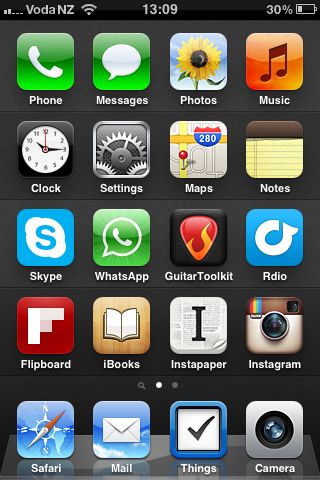
My current iPhone homescreen
Essential Mac third-party software
I recently got a new MacBook Air at work.
Thanks to the increasing number of tools like iCloud, Dropbox and GitHub I can store and backup more and more of my digital stuff online. This makes setting up a new Mac from scratch pretty effortless. And so I did.
I thought it would be interesting to write down what third-party apps are essential for me to get work done. Here’s the list:
Dropbox
Apart from music, photos and code, I store all my documents here. This also includes my bash profile and gitconfig dotfiles to set up the respective tools.TextMate
Still my editor of choice.Git
For source control management. I definitely need to access my work and personal code repositories.Things
Despite missing cloud-sync, it’s still the only to-do app I want to use.Skype
For chat and calls.Alfred
Quick access to anything on your Mac and the web.Jumpcut
To be able to access my clipboard history.Divvy
The best window management software.Rdio
On-demand music to listen to throughout the day. It’s absolutely fantastic.1Password
My password manager of choice. Great for storing other sensitive data, too.Skitch
For taking and annotating screenshots.MenuMeters
Drives me crazy when I can’t monitor how my Mac is performing.Homebrew
The easiest way to install UNIX tools.rbenv and ruby-build
For installing and running different versions of Ruby.Rubygems
Essential when programming with Ruby and Rails.Chrome
Mostly to access Flash content without having to install Flash Player for Safari.
I will install more software as time goes on, but since I didn’t need to install them so far, I wouldn’t call them essential.
Automator workflow for quick and easy screenshot sharing via Dropbox
I created a simple Automator workflow to quickly share screenshots via Dropbox. Here’s what it does:
- Detect when a new screenshot is added to the Desktop
- Move the image to
~/Dropbox/Public/Screenshots/ - Copy its public link to the Clipboard
Currently I use this mostly for adding sceenshots to GitHub Pull Requests and Issues.
If you think this is useful for you, too, head over to the Goodies section for the download and installation- and modification-instructions.
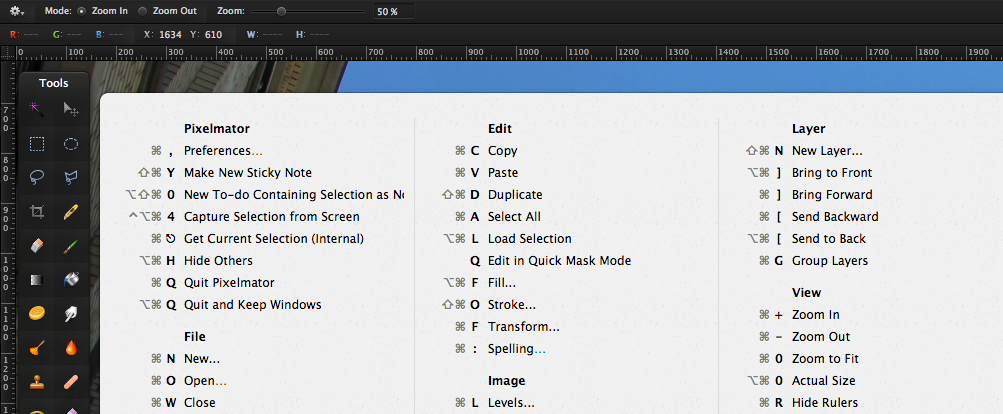
CheatSheet shows you the available shortcuts of the active application after holding the command-key for 2 seconds. Then a panel will show up displaying the shortcuts of the application you are currently working in.
I can see this being incredibly useful to folk who are new to OS X, and existing users who are learning a new, complex app.
Clever.
Today I learned that you can swipe your iPhone’s recently used apps panel to the right twice - which reveals the Airplay button I only knew existed on the iPad.
That meant I could listen to the new Testament song through the Soundcloud HTML5 player widget in Safari on my iPhone on my stereo via air. Super-awesome.


An inside look at how we use Basecamp
So we built in a special feature that’s unique to our [37signals’] Basecamp account that allows us to make one of our projects completely public. It’s read-only, it can’t be changed, but you can see all the discussions, to-dos, files, etc., just as they happened.
It’s pretty amazing they made this public and are planning to make even more projects available publicly. When do you ever have a chance to get such a raw glimpse at how a widely successful company works?
I think it’s fascinating to see how they talk to each other, how they disagree and agree, and how they learn from their own history.
This last example really highlights the benefits of writing things down.
If you have any interest in software development, this is a must-read.
Things 2.0 and Things Cloud Available
After two years or so in the making, cloud sync finally comes to my favourite to-do list app.
That’s great news. I will so not miss losing data when accidentally leaving Things running on two Macs at the same time while syncing via Dropbox.
Why I Gave My Company a Month Off
Jason Fried:
How can we afford to put our business on hold for a month to “mess around” with new ideas? How can we afford not to? We would never have had such a burst of creative energy had we stuck to business as usual.
Bottom line: If you can’t spare some time to give your employees the chance to wow you, you’ll never get the best from them.
Why Blacksmiths are Better at Startups than You
Amy Hoy:
Until now, [the students have] always worked for approval, abstracted from results: the question has always been, Is this the answer the teacher wants? or Did the committee like it? — not Is it true? and Did it help the customer?
It’s as if Galileo dropped his ball and feather from the top of the tower and, as they fell, sought to convince his audience by argument instead of simply looking.
This is the way most of us grow up to live, learn, and work. And it’s toxic.