“I have only ever designed products that I myself would like to live with so it goes without saying that we live with Braun products and Vitsoe furniture. As a designer, it is only by using your products daily that you are able to tell what sorts of improvements may still be needed.”– Dieter Rams in Simplicity, purity and openness. (via 37signals)
“Brooks’s law is a principle in software development which says that “adding manpower to a late software project makes it later”. It was coined by Fred Brooks in his 1975 book The Mythical Man-Month. Brooks adds that “Nine women can’t make a baby in one month”.”—
Only thing more astounding than the immutability of this 35-year-old observation is the number of smart people who know Brooks’s Law but somehow believe their project can be its first exception.
Absolutely one of my favorite examples of the lying Lizard Brain.
Check out this talk by Seth Godin for more on the Lizard Brain.
You-Centric: The Future of Browsing on Vimeo (via Vimeo)
This is a great talk! I was really impressed when Aza presented Mozilla’s Ubiquity.
Ubiquity is often descibed as Quicksilver for the browser or the web.
Ubiquity is a Firefox extension that lets you write and execute commands right inside Firefox. So for example you can translate words on the current page, edit images on the current page (!) or get a Google map for an address on the fly (without the need to open Google maps, insert the address etc.).
Be sure to check out this video to see it in action! It’s incredible.
Unfortunately, the Pixastic image editor he uses in this talk does not support the current Ubiquity API, so you can’t use it (for the moment).
I don’t like Quicksilver, but I am using Ubiquity for a couple of days now and love it!
And if you want to extend the set of commands, there are already a lot of third party commands out there!
As a Ruby on Rails developer I really like the rdoc search command.
Chrome OS: Internet failing at PC > PC failing at Internet
Saving files, copying them, syncing them—this is all pointless clerical work that I want my computer to do for me. ChromeOS officially nukes the “file” as a core user-facing OS abstraction. This is a huge victory for users everywhere[…]
(via Daring Fireball)
Chrome OS And The Microsoft Squeeze
Interesting article by The Washington Post on Chrome OS and what this might mean for Microsoft and Windows.
Google isn’t trying to compete with a standard OS, they’re trying to help users realize that for the majority of computing they do, they don’t need one in the first place. Maybe you have a desktop computer at home for those few tasks that need dedicated native applications, and maybe that runs Windows or maybe that runs OS X. But maybe the machine that you use most of the time is your cheap, fast ChromeBook.
Log in or sign up?
Both! In the same form. I like when people care that much about their UI and UX.
“Any fool can write code that a computer can understand. Good programmers write code that humans can understand.”– Martin Fowler, “Refactoring: Improving the Design of Existing Code”
“The dirty little secret about simple: It’s actually hard to do. That’s why most people make complex stuff. Simple requires deep thought, discipline, and patience[…]”– How Chipotle, Pinkberry, and others win big by doing just a few things well - (37signals)
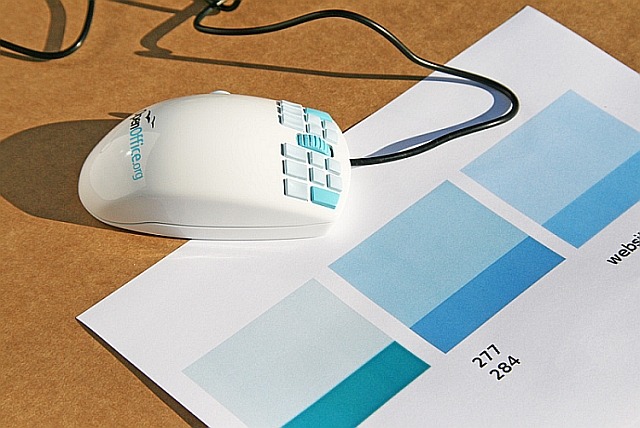
OpenOfficeMouse: The Multi-Button Application Mouse for OpenOffice.org
(via Gruber)
Why do some people seriously think, this is a good idea?
This mouse also reminded me of a great graphic by Eric Burke:

“There’s a common attribute that makes for good designers, good engineers, good employees, and good companies. For a long time, I couldn’t figure out what it was. Was it practice? Was it skill? Was it innate ability? Turns out, it’s none of those. It’s taste.”– Dustin Curtis
For Immediate Relief: Speaking Like a Human
Merlin Mann on NewsGator’s “NewsGator Platinum Partner Program Leverages Best Enterprise Social Computing Minds to Ensure Enterprise 2.0 Adoption Success” press release:
Regardless of the industry, audience, or purpose, this is just bad writing for non-people.
…and…
Setting aside that it’s an announcement about a future announcement, you got yourself a greatest hits of ineffective writing going on here. You got passive voice, buzzword bingo, empty adverbs, tons more passive voice, and a piquant use of “air quotes” that lightens up a non-nutritional buzzterm even the writers seem to think makes no sense.
…and…
[…] if you’re working in a job where your credibility is pegged to saying things that literally don’t make sense, then there’s a good chance what you’re doing doesn’t make sense either. If what you’re doing does make sense, then, for Christ’s sake, talk like a human being.
The lesson of the Sidekick failure
I’m happy to announce that Tumblr will be releasing an easy backup tool in the coming weeks.
A Grander K
What is a kilogram? It’s 2.2 pounds, of course. Or is it? The kilo is the only basic international standard pegged to a physical object—a 120-year-old platinum-iridium cylinder kept in a vault outside Paris and known as Le Grand K

Personas are a powerful tool for helping you to better understand the needs of your users. In this comic, drawn exclusively for Think Vitamin, you’ll learn more about Personas and how they’ll revolutionize the way you design and build web sites.

ABTests.com is the first website I see (and the only one so far), making it possible to display the password your are typing when registering a new account.
I was wondering when it’ll be the first time I’ll see this after reading Jacob Nielsen’s Stop Password Masking:
Usability suffers when users type in passwords and the only feedback they get is a row of bullets. Typically, masking passwords doesn’t even increase security, but it does cost you business due to login failures.
They use two input fields to do this - one of type=“password” and one of type=“text”. They hide/show them according to whether the checkbox it ticked or not:
<label for="id_password1">I want my password to be
    <input type="password" name="password1" id="id_password1" />
    <input type="text" class="" style="display: none;">
</label>
<input id="show-password" type="checkbox" class="show-password">
<label for="show-password" id="show-password-label">Show password</label>
Do you know of other websites that do this?