Alien Trees


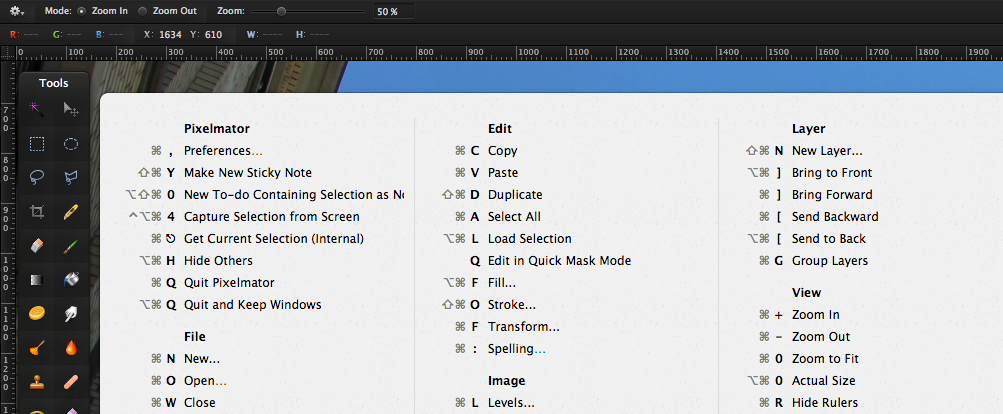
CheatSheet shows you the available shortcuts of the active application after holding the command-key for 2 seconds. Then a panel will show up displaying the shortcuts of the application you are currently working in.
I can see this being incredibly useful to folk who are new to OS X, and existing users who are learning a new, complex app.
Clever.
Great update to one of my favorite iOS apps.
RAVAGE R.I.P HMHTV (by HMHTVchannel)
27 Januar 2012. Das Todesdatum von RAVAGE!
Die Neusser/ Düsseldorfer Death/Thrash-veteranen haben nach langer Bandgeschichte den Schlussstrich gezogen.
Auf ihrem eigenen Festival “BATTLES NEUSS” gabs also den letzten Gig der Jungs.
Das macht mich etwas wehmütig. Als wir 2008 Deutschland verlassen haben, dachte ich, ich würde “nur” ein Jahr weg sein und dann wieder zurück in der Band sein. So ist es nicht gekommen und nun hat sich die Band aufgelöst. Sehr schade.
Aber toller Bericht!
If you’re using Aperture for organizing and/or editing your photos, this is a great overview of its features.
I am learning lots of new stuff, although I’ve been using it for quite some time now.

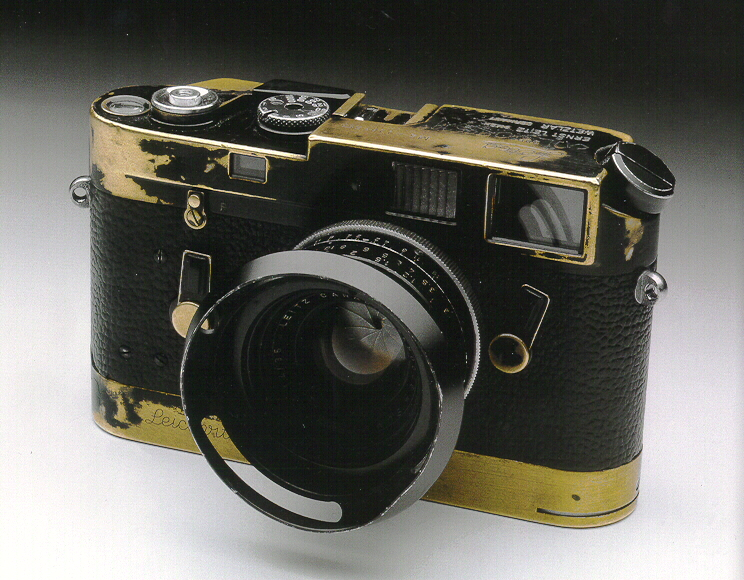
Jim Marshall’s Leica M4. Do things this way.
“The other key disruptor is empathy. Probably every company would say they try to understand their customer — and that they’ve done the market research to prove it! — but what I’m talking about in this context is a bit more subtle, it’s a combination of respect and emotional intelligence (i.e. the ability to recognize and relate to the feelings of another person) that enables you to create truly amazing user experiences. (Instagram is a good example of a company that soared ahead of its competition with a better designed, empathy-driven product.) I just don’t think it’s possible to build an amazing product or app or whatever without being able to empathize with and understand the person who is supposed to be using it. On some fundamental level great design is able to get into the mindset of a user and anticipate, guide, and delight. None of that is possible without empathy.”–
Generosity, empathy, and disruption | peter.roj.as (via Heather Rasley)
This is why I’m skeptical of things like UX research and A/B testing. Either you, as the person building a product, have the passion and empathy to create something that people will truly love, or you don’t. No amount of research will lead you to something that people embrace in the way they embrace something like Instagram, and in my experience things that are the product of research can often end up feeling functional but a bit hollow. (via buzz)
So true in my opinion. The whole article is a great read. Here’s another gem:
There is just a total disconnect between the people making the stuff being sold and the people who are supposed to be buying it, and that gap is empathy.

One of my favorite interview questions for engineering candidates is to tell me about one thing they liked and one thing they disliked about the engineering culture at their previous company. Over the course of a few hundred interviews, this interview question has given me a sense of what good engineers look for and what they’re trying to avoid. I also reflected back on my own experiences from the past six years working across Google, Ooyala, and Quora and distilled some things that a team can do to build a good engineering culture:
An absolutely fascinating read.
I created a simple Automator workflow to quickly share screenshots via Dropbox. Here’s what it does:
~/Dropbox/Public/Screenshots/Currently I use this mostly for adding sceenshots to GitHub Pull Requests and Issues.
If you think this is useful for you, too, head over to the Goodies section for the download and installation- and modification-instructions.
GitHub started using a custom font for their icons. Totally my taste. I try to get by without graphics as much as I can myself. Of course, that’s partly because of me being bad at creating them. But it’s also because it has its advantages:
We try to leverage CSS3 techniques like rounded corners, gradients, and @font-face across all pages of the site. This allows us to focus more on what we can render in the browser, and less on images. This results in better page loads and an overall better experience for you.
Not only are we concerned with speed, but also clarity. With the introduction of new retina screen products, we realize that it’s more important than ever to have our site beautiful at any zoom level.
A fascinating - and sad - read about what happened to Flickr after it was acquired by Yahoo.
I’m still optimistic that Flickr will get its act together again. The updates this year so far have been great and plenty - which you can’t say at all about the recent years in general.
I recently got a new MacBook Air at work.
Thanks to the increasing number of tools like iCloud, Dropbox and GitHub I can store and backup more and more of my digital stuff online. This makes setting up a new Mac from scratch pretty effortless. And so I did.
I thought it would be interesting to write down what third-party apps are essential for me to get work done. Here’s the list:
Dropbox
Apart from music, photos and code, I store all my documents here. This also includes my bash profile and gitconfig dotfiles to set up the respective tools.
TextMate
Still my editor of choice.
Git
For source control management. I definitely need to access my work and personal code repositories.
Things
Despite missing cloud-sync, it’s still the only to-do app I want to use.
Skype
For chat and calls.
Alfred
Quick access to anything on your Mac and the web.
Jumpcut
To be able to access my clipboard history.
Divvy
The best window management software.
Rdio
On-demand music to listen to throughout the day. It’s absolutely fantastic.
1Password
My password manager of choice. Great for storing other sensitive data, too.
Skitch
For taking and annotating screenshots.
MenuMeters
Drives me crazy when I can’t monitor how my Mac is performing.
Homebrew
The easiest way to install UNIX tools.
rbenv and ruby-build
For installing and running different versions of Ruby.
Rubygems
Essential when programming with Ruby and Rails.
Chrome
Mostly to access Flash content without having to install Flash Player for Safari.
I will install more software as time goes on, but since I didn’t need to install them so far, I wouldn’t call them essential.