Coding Horror: The Great MP3 Bitrate Experiment
Jeff Atwood wanted to find out if his readers could spot the differences between several encodings of the same song in a different quality - from 128 kbps all the way up to raw CD quality.
Jeff Atwood wanted to find out if his readers could spot the differences between several encodings of the same song in a different quality - from 128 kbps all the way up to raw CD quality.
Boom!
The interesting (to geeks like us) part is this: what system that works like Twitter could exist without a company behind it?
Think about it this way:
Under the hood, following somebody is really just subscribing to a feed of their statuses. Posting is really just updating a feed of your own statuses.
So you standardize on a feed format. RSS would work great, of course, and there’s a ton of RSS reading and writing code out there already — and it’s not like it’s dead. (For instance, just this week Apple released a major iPhone app that uses RSS.)
Any given feed could live anywhere on the web.
It would be amazing if such a thing came to life.
But then we started using credit cards remotely, first by making payments over the telephone and later for use over computer networks. Neither physical possession of the cards nor a signature on paper could be used for authentication any more. So the card numbers themselves, along with the three digit security (CVV), codes became the means of authentication. As with Social Security numbers, we ended up using a piece of information for authentication that was never designed to be used that way.
A great post on Identification vs. Authentication, and why it’s unclear to some people, how credit cards and the like work.
Marissa Mayer:
DATA IS APOLITICAL.
“When I meet people who run design at other organizations, they’re always like, ‘Design is one of the most political areas of the company. This designer likes green and that one likes purple, and whose design gets picked? The one who buddies up to the boss.’
Some companies think of design as an art. We think of design as a science. It doesn’t matter who is the favorite or how much you like this aesthetic versus that aesthetic. It all comes down to data. Run a 1% test [on 1% of the audience] and whichever design does best against the user-happiness metrics over a two-week period is the one we launch. We have a very academic environment where we’re looking at data all the time.
We probably have somewhere between 50 and 100 experiments running on live traffic, everything from the default number of results to underlined links to how big an arrow should be. We’re trying all those different things.”
John Gruber on the Retina MacBook Pro and high-dpi displays:
A revolution in resolution.
Amy Hoy:
Until now, [the students have] always worked for approval, abstracted from results: the question has always been, Is this the answer the teacher wants? or Did the committee like it? — not Is it true? and Did it help the customer?
It’s as if Galileo dropped his ball and feather from the top of the tower and, as they fell, sought to convince his audience by argument instead of simply looking.
This is the way most of us grow up to live, learn, and work. And it’s toxic.
I’m planning to upgrade my 2011 15” MacBook Pro’s hard drive with an SSD. Currently I’m still running on a 5400rpm 500 GB HDD. When I ordered the Mac two years ago, I intentionally went with the cheapest HDD option – this one – with the plan to upgrade it with an SSD setup 1.5–2 years later when SSD prices have come down. It’s now 2.5 years later and I’m finally looking at some options.
I’m primarily looking for the performance increase in the upgrade. But I’m also going to run out of HDD space fairly soon, and it would be nice to still be able to fit all my data on that one machine after the upgrade.
Out of the 500 GB I currently have, most of it is occupied by my photos and movies in the Aperture library. The library is currently taking up 275 GB. I would only need fast access to the more recent photos – not further back than one year. The rest is merely an archive.
My iTunes library is another 55 GB that doesn’t need SSD-grade speed.
So most of these files could live on a/the good old spinning hard drive without a problem. But I’d definitly want to keep my music available on the MacBook’s internal hard drive. I need my music with me at all times.
Here’s what my current storage allocation looks like:

To keep all my data on the MacBook, I’d have to increase the disk space to at least 750 GB. I think this amount would easily last me for the next few years. Here are the options I am considering, ordered from cheapest to most expensive:
(A fifth option would be to get a 500 GB SSD and the Hardwrk Kit to have a 1TB Fusion Drive internally. But price-wise this is pretty close to option 4, which I would chose over this option anyway.)
The reason I consider the more expensive Pro SSD for the 250 GB setup, is that the 250 GB EVO seems to drop a bit in performance compared to the 500-GB-and-up EVOs. The Pro is closer – and slightly better even – to the bigger capacity EVOs.
The most affordable solution. The Hardwrk Kit replaces the DVD drive with an adapter that can house another drive – HDD or SSD. It also comes with a enclosure for the DVD drive, so you can still use the drive via USB.
I’d put my existing HDD into the adapter and the SSD in the place of the HDD. Then I’d use Mac OS X’s FusionDrive to combine the SSD and HDD into one logical volume and let the operating system decide what lives on the SSD and HDD respectively.
I don’t care much for having a DVD drive internally. So making that external via the Hardwrk Kit is perfectly acceptable to me. The only downside would be, that I’d need to take that component apart as well.
The same setup as option 1, but with a more performant SSD.
Internally, a pure SSD setup. The existing HDD would be put in an external USB enclosure to hold additional data.
The most expensive option, but certainly the one I’d prefer, if I left costs out of the equation.
Option 4 would certainly be the best one performance- and convenience-wise. Also, it might be the most future-proof and least error-prone solution. But is it really necessary to have all my data on an SSD at all times?
FusionDrive seems to work quite nicely and options 1 and 2 would give me the necessary speed plus big storage capacity without having to manage it manually, either. Especially option 1 seems to be great value for money.
I’m least convinced with option 3. Mostly because it means I’d need to start managing data on an external drive in addition to the data on the MacBook.
So, we’ll see. I guess I have to sleep on it for another night or two.
It’s not so obvious, or is it?
Update: I went with option 1.
I went with option 1: installing a Samsung 250 GB EVO SSD in place of my existing 500 GB HDD and replacing the DVD-drive with the Hardwrk-Kit plus the 500 GB HDD.
Feedback from a few people helped me making the decision. All of them are running a similar setup — or pretty much the same even. All of them are very happy with it and haven’t had any problems.
Here’s what the storage allocation now looks like:
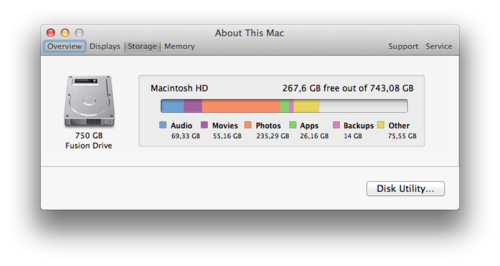
And here are the steps I’ve taken:
The disassembling and reassembling of the hardware turned out to be easy. The manuals are very detailed and the hardware is laid out pretty obviously anyway.
I’ve used the setup for a day now, and everything’s running smoothly and really fast. Happy, happy, joy, joy.
As the Mac turns 30, I realised that I’ve been using Macs for 10 years myself now.
“The Switch” started in 2003 — during the end of my apprenticeship — when a colleague regularly brought his personal 12-inch PowerBook G4 to the office. It caught my attention, and I spend quite a bit of time learning about his computer. He was happy to tell me all about it — and Apple in general, too.
I ended up buying this very PowerBook from him at the beginning of 2004. I’ve been using Macs ever since, and I haven’t looked back.
The Mac and Mac OS X felt like the sweet spot to me. It seemed to be like a merger of the good bits of Windows and Linux with an extra dose of taste, logic and fun on top. Over the years, I’ve owned 3 Macs:
I’ve used three more Macs given to me at my workplace: a 2009 21.5-inch iMac, a 2009 (or 2010) MacBook Pro 15-inch, and a 2011 MacBook Air 13-inch.
All the Macs I’ve used have been fantastic machines. And they just keep getting better with every generation.
So, happy birthday, Mac!
If you hadn’t been created, I’d be using a different computer and I wouldn’t even miss you.
Bitcoin is giving banks a run for their money. Now the same technology threatens to eradicate social networks, stock markets, even national governments. Are we heading towards an anarchic future where centralised power of any kind will dissolve?
Totally worth your time.

Interesting new rendering of a rumoured upcoming 12-inch MacBook Air.
If the following turns out to be true, I currently can’t imagine how this is going to be practical:
The upcoming 12-inch Air has the fewest amount of ports ever on an Apple computer, as can be seen in the rendition above. On the right side is a standard headphone jack and dual-microphones for input and noise-canceling. On the left side is solely the new USB Type-C port. Yes, Apple is currently planning to ditch standard USB ports, the SD Card slot, and even its Thunderbolt and MagSafe charging standards on this new notebook. We must note that Apple tests several designs of upcoming products, so Apple may choose to ultimately release a new Air that does include the legacy components, though there is very little space on the edges for them.

[…] everyone is in a “war for attention.” But it uses unique visitors as the way to compare how different outlets are doing in this war: […]
By this metric (misleadingly labeled “readership”), Buzzfeed is “bigger” than The New York Times. But that’s the exact same metric that would tell us last week was bigger for Medium than that week in October. Even if all we care about is attention — not any other value that may be important— this doesn’t tell us much. Maybe BuzzFeed gets more attention, total, than The Times. But we should stop purporting that one-dimensional graphs like this tell us that.
It was yesterday early evening when my MacBook Pro decided to give me lots of error messages regarding corrupt or missing files in increasing frequency. All these messages indicated a problem with my hard drive: my manually created Fusion Drive consisting of a 256GB SSD and a 500GB HDD.
Disk Utility confirmed that the drive needed repair, but told me I have to repair it when booting from the Recovery Partition. But trying to repair it from there was not successful, either. And from then on the machine refused to boot. It crashed/turned off, right after I entered my password – which I had to enter early, because my drive was encrypted with FileVault.
I have been a bit suspicious of my Fusion Drive in the past 1.5 years, because most times when I checked with Disk Utility, it was in need of repair. This could be repaired most of the time, but I was still not feeling too good about it.
And then I found out after the crash yesterday, that the original author of the “How to build your own Fusion Drive”-tutorial does not use a Fusion Drive on HFS+-formatted hard drives, because he found it’s not keeping his data safe:
Btw.: I will actually not use Fusion drive on a Mac as HFS+ is not really keeping my data safe (see my HFS+ fails miserably demo). Using two HFS+ disks concatenated just increases the risk of data failure. And TimeMachine as backup has failed me as well in the past.
So, I decided to split up the Fusion drive, re-installed Yosemite on the SSD, and copied over my data from the Time Machine backup via Migration Assistant.
Now I keep the OS, apps, code and as much of the other data as possible on the SSD, and store my large media files (photos, music, videos) on the old, spinning, still-internal HDD.
I don’t know what the underlying problem was really, but I’m not keen to risk my data to a buggy Fusion Drive any longer. My system is now back up and running again and Disk Utility tells me that both my SSD and my HDD “appear to be OK”.
Tim Cook:
The United States government has demanded that Apple take an unprecedented step which threatens the security of our customers. We oppose this order, which has implications far beyond the legal case at hand.
This moment calls for public discussion, and we want our customers and people around the country to understand what is at stake.
I hope most tech companies will finally back Apple in this fight for privacy and freedom!