Great update for one of my favorite iPad apps, including a new feature I have been waiting for (length & progress indicators). But what really strikes me with this update and blog post, is to see how much thought goes into Instapaper’s features and Marco’s attention to detail.
Just look at the section about the new automatic dark mode preference:
You can now have Instapaper automatically use dark mode at night and normal (light) mode during the day.
But how, exactly, do you define “night”? There’s no API access to the iPhone’s ambient light sensor, so I can’t just enable dark mode in dark rooms.
And I can’t just define hour boundaries, because 8 PM in December is much darker than 8 PM in June.
And I can’t just look at hours and the date, because 5 PM in December is much darker in Alaska than in Costa Rica.
So I used with the most reliable method I could think of: sunset times in your location. Yes, Instapaper is now location-aware, but only for this feature.
I love this.
For example, he could have presented that slot-machine-ish control to the user to set the time range when it’s dark. He didn’t and I think that’s awesome, because it makes it almost effortless for the user to use the feature. And it’s very clever.
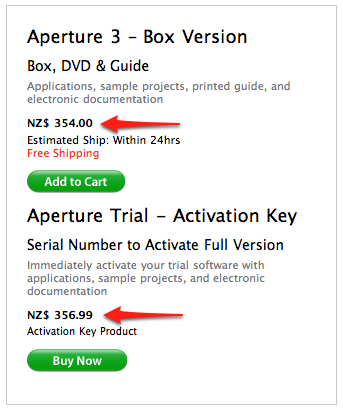
Of course, it’s cheaper to manufacture a DVD, print a guide, put it in a nice box and make a real person deliver it, than just sending a couple of bytes over a telephone line.
Prior to last week, the limit was improperly calculated: articles in folders weren’t being counted. I fixed the bug so that up to 250 articles were downloaded from the Read Later folder, and the other folders were downloaded in order, as long as there were any slots left, until it hit 250.
And then I got a deluge of email.
My email was one of them.
Great to see an explanation for this.
This nice little Ruby library/gem/plugin is a great helper when you need to execute long running tasks from the terminal.
As the name suggests, it displays the progress of the task and even gives you an ETA for when it thinks it will be done.
Check their examples:
I had some problems installing the heroku gem on Leopard:
$ sudo gem install heroku
Building native extensions.  This could take a while...
ERROR:  Error installing heroku:
    heroku requires json_pure (>= 1.2.0, < 1.5.0, runtime)
So I tried to install the json_pure gem first (sudo gem install json_pure), but this always seemed to install/update the json gem instead of the json_pure gem.
I eventually managed to install the correct gem by providing the version number on installation:
sudo gem install json_pure -v 1.2.4
This installed the json_pure gem and I was also able to install the Heroku gem afterwards.
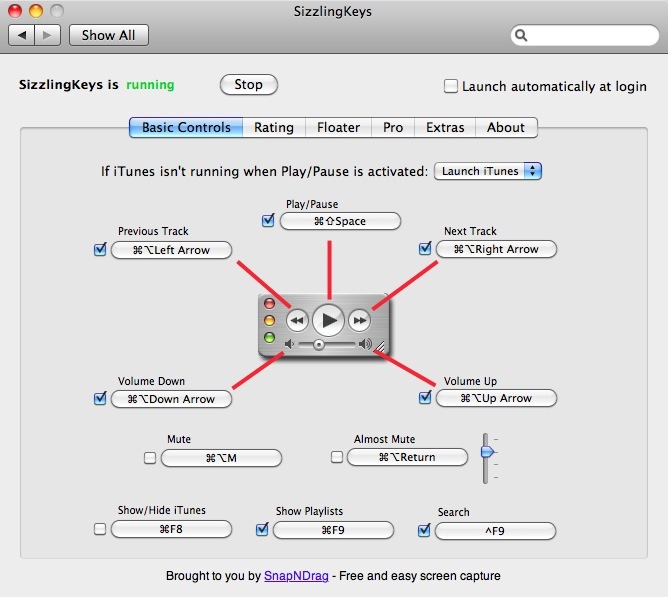
Sizzling Keys lets you control iTunes from the keyboard.
One of my favorite little apps. I have it running all the time.
You wouldn’t drink 9 year old milk.
So why use a 9-year-old browser?
When Internet Explorer 6 was launched in 2001, it offered cutting–edge security – for the time. Since then, the Internet has evolved and the security features of Internet Explorer 6 have become outdated.
The brilliant Paul Irish built a CSS3 rule generating web app that he calls, “CSS3, Please!” Using automated vendor specific code, you can make box-shadow, gradient, rgba, even rotate, work in IE, Mozilla and WebKit.
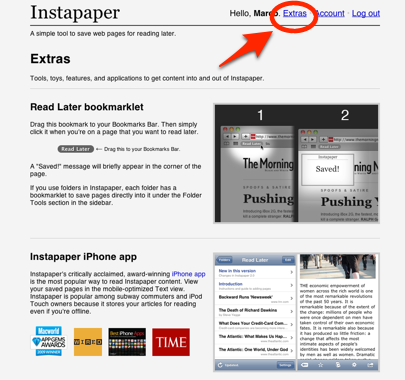
Check out the new Extras page. I bet there’s at least one feature on there that you didn’t know about.
That’s great. I didn’t know about this:
Google Reader
Send items directly from Google Reader simply by clicking the Instapaper Read Later >bookmarklet with an item selected.
I always used the ‘Send to’ option, which requires more clicks.
And I also wasn’t aware of the the Readability-like functionality.
Instapaper Text bookmarklet
Install this bookmarklet to instantly view any compatible web page in Instapaper’s >Text view, right in your browser.
If you are not using Instapaper, I can just encourage you to try it out. It makes reading on the web a joy. You can save pages to read later and can also read these articles without the clutter of ads and other distracting things. It also presents them in a serif font at an easy to read size.
It’s one of my favorite and most-used apps!