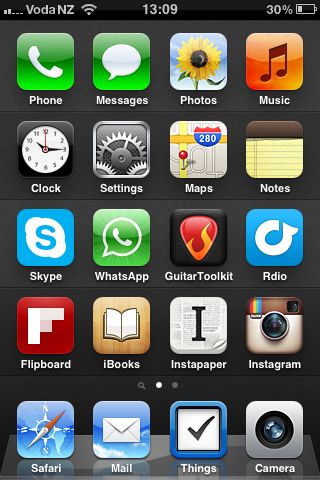
Today I learned that you can swipe your iPhone’s recently used apps panel to the right twice - which reveals the Airplay button I only knew existed on the iPad.
That meant I could listen to the new Testament song through the Soundcloud HTML5 player widget in Safari on my iPhone on my stereo via air. Super-awesome.
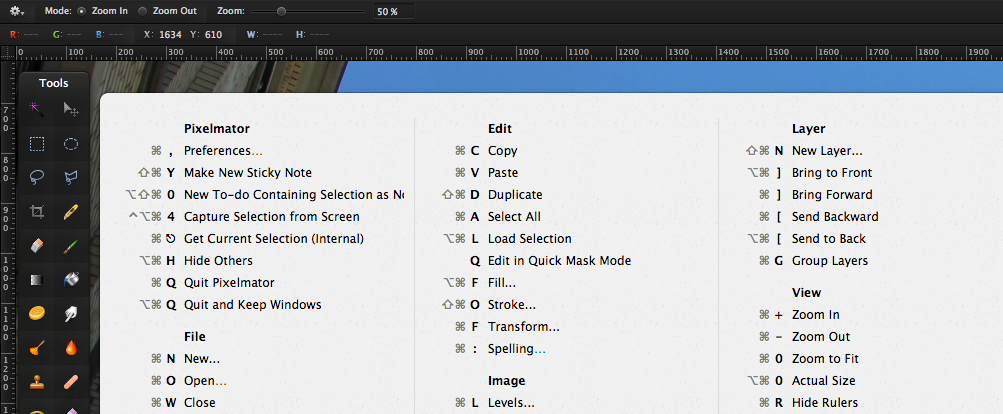
CheatSheet shows you the available shortcuts of the active application after holding the command-key for 2 seconds. Then a panel will show up displaying the shortcuts of the application you are currently working in.
I can see this being incredibly useful to folk who are new to OS X, and existing users who are learning a new, complex app.
If you’re using Aperture for organizing and/or editing your photos, this is a great overview of its features.
I am learning lots of new stuff, although I’ve been using it for quite some time now.
“The other key disruptor is empathy. Probably every company would say they try to understand their customer — and that they’ve done the market research to prove it! — but what I’m talking about in this context is a bit more subtle, it’s a combination of respect and emotional intelligence (i.e. the ability to recognize and relate to the feelings of another person) that enables you to create truly amazing user experiences. (Instagram is a good example of a company that soared ahead of its competition with a better designed, empathy-driven product.) I just don’t think it’s possible to build an amazing product or app or whatever without being able to empathize with and understand the person who is supposed to be using it. On some fundamental level great design is able to get into the mindset of a user and anticipate, guide, and delight. None of that is possible without empathy.”
This is why I’m skeptical of things like UX research and A/B testing. Either you, as the person building a product, have the passion and empathy to create something that people will truly love, or you don’t. No amount of research will lead you to something that people embrace in the way they embrace something like Instagram, and in my experience things that are the product of research can often end up feeling functional but a bit hollow. (via buzz)
So true in my opinion. The whole article is a great read. Here’s another gem:
There is just a total disconnect between the people making the stuff being sold and the people who are supposed to be buying it, and that gap is empathy.
One of my favorite interview questions for engineering candidates is to tell me about one thing they liked and one thing they disliked about the engineering culture at their previous company. Over the course of a few hundred interviews, this interview question has given me a sense of what good engineers look for and what they’re trying to avoid. I also reflected back on my own experiences from the past six years working across Google, Ooyala, and Quora and distilled some things that a team can do to build a good engineering culture:
GitHub started using a custom font for their icons. Totally my taste. I try to get by without graphics as much as I can myself. Of course, that’s partly because of me being bad at creating them. But it’s also because it has its advantages:
We try to leverage CSS3 techniques like rounded corners, gradients, and @font-face across all pages of the site. This allows us to focus more on what we can render in the browser, and less on images. This results in better page loads and an overall better experience for you.
Not only are we concerned with speed, but also clarity. With the introduction of new retina screen products, we realize that it’s more important than ever to have our site beautiful at any zoom level.
I recently got a new MacBook Air at work.
Thanks to the increasing number of tools like iCloud, Dropbox and GitHub I can store and backup more and more of my digital stuff online. This makes setting up a new Mac from scratch pretty effortless. And so I did.
I thought it would be interesting to write down what third-party apps are essential for me to get work done. Here’s the list:
Dropbox
Apart from music, photos and code, I store all my documents here. This also includes my bash profile and gitconfig dotfiles to set up the respective tools.
I recently subscribed to Rdio. What an amazing new(ish) music service.
For NZD 13.90 a month - less than the price of one album on iTunes - I can pretty much listen to anything. I don’t have to own it and everything is streamed in excellent quality (256 kbps MP3 files) to my MacBook, my iPad and my iPhone. I can even download albums and songs to my mobile devices to enjoy offline or on-the-go.
The software is great, too. Signing up, setting up, navigating, discovering, listening, using - everything is top notch. I regularly catch myself listening to music on Rdio, although it’s in my iTunes library and I wouldn’t have to stream it. It’s just more convenient.
What I particularly like is the “Queue”, to which I can constantly add new albums to and don’t have to worry that it stops playing.
Of course, there are things that could be better. My biggest complaint is the unavailability of quite a few albums due to licensing restrictions. Although I very rarely find an album they don’t have in their catalogue at all, sometimes albums are just not available in New Zealand at this point. I really hope that gets better over time.
Other features I would like to see are the ability to rate/like/favorite songs as well as Airplay support for the Mac Desktop app.
But all in all, Rdio is amazing value for money. And for me, it makes discovering and listening to music fun again without having to ponder on what albums I am going to spend money on next.
Some detailed information on how Aperture and Photo Stream work together. For example, I recently wondered how RAW files are handled:
According to the Aperture documentation, how RAW interacts with Photo Stream isn’t immediately obvious — but it is very important that you understand it. If you send a RAW file from Aperture to Photo Stream — either automatically via the “import all” checkbox, or manually — and if that RAW file has no edits applied, then it’s the full-sized original RAW that ends up in Photo Stream. On the other hand, if it has had edits applied then Photo Stream ends up holding a JPG copy instead.
Very comprehensive review of iPhoto for iOS. It explains a lot of details that might not be so obvious - including this one which I found confusing:
Pay close attention to these red “LEDs.” They signal that processor-intensive effects have been applied that are temporarily disabled while other editing is being done.
Since version 10.6 of iTunes you can stop syncing apps between your Mac and iOS devices without being prompted to delete all apps from the devices.
When you do that, the problem described in the article that you are prompted to remove iPhoto on every sync disappears and sync continues to work just fine.
Performance on the iPad seems to be normal. No problems so far. On the 3GS it is a bit slow when editing photos.
If you’re still using the bookmarking service, I recommend jumping ship to Pinboard. It will happily import all your del.icio.us bookmarks, and works very much like del.icio.us used to, minus the social aspects.
That’s exactly what I am going to do. I was never really happy with delicious, apart from the fact that I have my bookmarks with me wherever I have an internet connection. Pinboard looks promising and I have looked at it several times now, but never switched (probably due to lazyness and delicious somehow “doing the job”). I guess now’s the right time to finally do it.