I was a little bit nervous this time: Because I had rated the HP5s at EI 3200 – a 3-stop push – and I have only done that once before a couple of years back. But the negatives came out looking really good!
While pouring and waiting and agitating I listened to Rick Rubin.
Didn’t manage to finish the article I originally intended to publish. Instead, I spent too much time today on some custom map tiles implementation for an app. But it’s Friday night. I should start fresh on Monday.
I think I’ll now have a beer and develop the two rolls of 120 film from December I have still lying around.
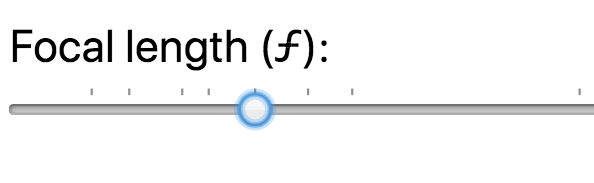
The datalist can specify input values as an <option> element. Supporting browsers – like Chrome for example – use this information to put little marks along the top of the range slider to indicate positions (= values) of particular interest.
I use this feature to mark common focal lengths in the 35mm format: 10 mm, 16 mm, 24 mm, 28 mm, 35 mm, 43 mm, 50 mm, 85 mm, 100 mm, 135 mm, and 200 mm.
What’s even cooler, is that Chrome lets the input’s handle snap to these positions.
Here’s a enlarged screenshot of what it looks like:
For my Focal Length Equivalent utility, I created a alternative view for when you don’t have JavaScript enabled (as you should, if you can).
Instead of dynamically showing the conversion based on the position of the range slider input element, I simply show a good old table with calculated equivalents at pre-defined focal lengths.
I wanted this table to list the focal lengths vertically – with one film- or sensor-format on one row – so you can easily parse the result. As such a table gets easily too wide for the parent elements container, I wanted
the table to be scrollable horizontally and
have the format name headings keep their position, so that you never lose track of which row represents which format.
The “scrolling” bit is easily done: simply put a overflow-x: scroll; on the table’s container element, which in my case is a <figure> element (a <div> or any other block element would also do of course, if the <figure> semantic doesn’t work for you):
figure {
  overflow-x: scroll;
}
In order for the film-format name headings to keep their position, I resorted to a fairly new value of the CSS position property: sticky. I added this to the th selectors, in combination with left: 0; so the headings stay at their original positions:
figure table tr th {
  position: sticky;
  left: 0;
  // you might also want a bg color, so the th covers the table
  // that scrolls through underneath
  background-color: white;
}
You can take a look at this when you go to the tool and disable JavaScript in your browser. Or you can simply look at this table here:
I recently cleaned up my Mac to free up disk space. And the best bang for the buck was from reclaiming disk space from Xcode and its tools. I got back several gigabytes.
So, if you use Xcode and you are in need of some disk space, here are a few directories where I’d look to see what you no longer need:
Reading my posts in the “How I took the shot” series, I realised they might come across as brag. But that’s not what I’m trying to say.
My point is rather, that in street photography there’s always a lot of luck involved – simply because for candid street shots you can’t plan anything. But also – that being patient and prepared are valuable skills to get better at as a street photographer.
By “being prepared” I mean both paying attention as well as having your camera set up correctly. There were many more unsuccessful attempts in the past where I waited and nothing interesting was happening. Or I didn’t wait long enough. Or I didn’t get the shot, because
I was not paying attention or
my settings weren’t right or
I wasn’t quick enough or
I didn’t dare to take the shot.
And that’s way worse: You can’t do anything about it when nothing interesting happens. But you can be ready, if it does. So I try to eliminate these four issues as much as I can. And then I’m sometimes even at the right place at the right time.
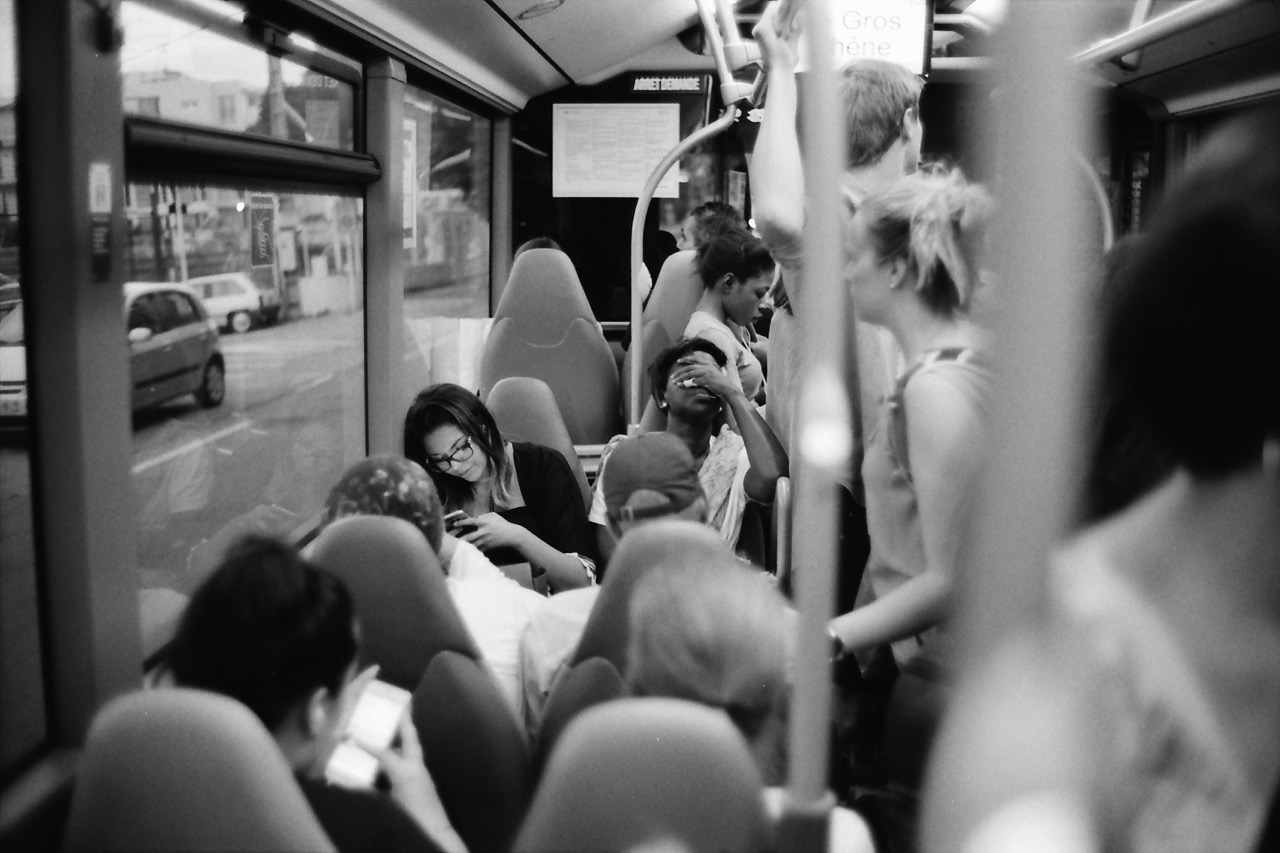
This photo was taken last June on a bus ride back from Nice to our campground. The challenge with this one was to be observant, quick and shooting in a moving vehicle while having other things to do, too.
After I got onto the bus, I took a read from my exposure meter on my iPhone to get a ballpark exposure for the bus’s interior. I preset my exposure to f/1.4 and 1/60th of a second (for my APX 400 film). I rarely shoot this lens at its maximum aperture, but this time I decided to do so, because I was on a moving bus and wanted to avoid motion blur.
I noticed this woman and I sensed she might make an interesting subject matter: she seemed tired and generally exhausted from the day. Because this was the most promising scene, I preset the focus already, too, using a person or object at the same distance1.
Then it was time to wait. It was a long bus ride.
And it took a while, but the waiting paid off. She had her hand over her eyes like this for maybe one to two seconds. Luckily I noticed. And because my Leica was around my neck, ready to shoot, I quickly raised it to my eye and took this photo.
Inside, I quietly went: “YES!”
Maybe all of this would have been trivial, if I was shooting a digital camera with auto-exposure and auto-focus. But who knows? Maybe then the auto-focus had missed or the camera wasn’t even powered on. ↩︎
For tools and utilities – like my focal length equivalent site for example – I like the idea of using the UI font of the operating system it is running on. The site’s typography better blends in with the OS that way and hence makes the site seem more familiar to its visitors.
My chosen fallback is simply sans-serif. I don’t think there’s any OS that’s using a serif font on the UI. Also, specifying the popular Helvetica, Arial in addition is pretty much redundant, as one of them is the default (and probably preferred) sans-serif font on its platform anyway.
Yesterday I visited the Webworker NRW Meetup in Düsseldorf. I used to visit their meet ups regularly, but haven’t been to a single one in recent years. Simply because I wasn’t here all that much.
Last evening was about Vue.js. I haven’t worked with any of the three currently most popular (or shall I say hyped?) JavaScript frameworks – React, Angular and Vue – so this was a good opportunity to start learning about them.
The Meetup itself has grown quite a bit. When I went the last time, it was still held at Garage Bilk with maybe up to 30-35 visitors maximum. The venue is now at Sipgate and there were around 130 people. The new home is great: their staff welcomes you, flawless technical setup and free snack and drinks.
So, I drank a little, I ate a little, met Stefan, and learned about Vue.js. Successful outing.
We currently live close to the local library. It’s a great institution to have nearby. Not only can we conveniently rent out books, magazines and other media for us adults, we can regularly get Zoe new children’s books for free and return them once she loses interest. She currently loves books, so this is very handy.
I love books, too. Mainly photo books. And today I bought not rented: during our visit Zoe let me browse their current “For Sale”-shelves for like two minutes and I was able to pick a few that interested me. After learning about the price, I bought them all. It was €10 altogether. I probably would have paid this for the Magnum book alone.
I’m very happy about these very affordable finds, but I’m worried I have photo book tsundoku or BAS: Book Acquisition Syndrome.
For one-column responsive layouts – like this blog for example – I like using width-based font sizes. Using the vw (view width) unit, the font size automatically scales based on the width of the viewport. It’s perfectly responsive without the need for media query breakpoints (at least initially, see below).
Here’s what I found to be a good calculation:
body {
  // 1em minimum font size (usually 16px) plus
  // 0.7% of the browser window’s total width
  font-size: calc(1em + 0.7vw);
}
This however stops working as intended, once the viewport starts becoming wider than the container the text resides in. It’s very common (for me anyway) to specify a maximum width of the main element that holds the text. But vw takes into account the width of the whole browser window, which inappropriately keeps increasing the font size, while the container width remains at the maximum width specified.
For example, this blog currently specifies a max-width of 700 pixels for its main content. So, I’d like to calculate font size based on the container width of 700px instead of the whole browser window width:
However, since the calculation is static, I ended up simply calculating it myself in ems and use that:
@media (min-width: 701px) {
  body {
    font-size: 1.306em;
  }
}
Can’t we just get max-font-size?
A note on CSS variables
While deciding on these statements above, I also tried out CSS variables to store certain values like the max-width of the container etc. to calculate the font-size like so:
need a breakpoint anyway to either redefine a variable or the calculation and
I’d need additional fallback statements for browsers that don’t understand CSS vars.
So, I decided against using them. For a more complex project, this might be a different story, but for a simple site with a pretty static design, that’d be total overkill and backwards in my opinion.
Do Not Look Down
I can’t get enough of Meshuggah at the moment. And in particular this song. Such a mean groove!
In good Meshuggah fashion, it’s polymetered:
The first riff for example is in 17/8 (that’s how I count it anyway), and both guitars/bass and drums play it like this initially. But after the first 8 bars (around the 26 second mark, after 2 rounds of that riff), the drummer’s hands start playing 4/4 time while his feet and the guitars stay in 17/8. From then on, the drumming stays that way. Which means you can easily nod your head all the way through, even though that might not be immediately obvious.
There’s a lot more going on throughout the whole song (which I haven’t completely analysed like this), and it’s so fun to listen to that I keep coming back over and over again.
The Internet privacy company that empowers you to seamlessly take control of your personal information online, without any tradeoffs.
For years now, I’ve been using DuckDuckGo as my search engine.
In 98% of the cases, it gets me what I’m searching for1. Unlike Google, it respects your privacy: they don’t track you!
DuckDuckGo is easily setup as your default search engine in every popular browser – both on desktop or mobile computers/phones. I use it on all my devices and I don’t want to go back.
I simply love how film looks. Especially the black and white variety. Both as a digital file scanned from a negative and – especially – as a gelatin silver print (which I’m not remotely creating enough of).
Admittedly, I had to get used to the 35mm look, but now it’s hard for me to go back. The low(er) resolution and graininess are no longer bugs – they’re features1. Digital looks too clean to me. And while I can still enjoy and consume and be impressed by digital photographs, and while you can also simulate the film look in post, it’s not what I’m currently interested in for my own photography2.
Film has this aesthetic that’s more detached from reality. I don’t know how to best describe it. Film not only looks great to me, it also makes me feel differently.
You better look at them on a high-resolution screen or as a print, though. ↩︎
What feels a bit silly is, that I even try to avoid shooting digitally, because whenever I take a good digital photo, I wish I had shot it on film. ↩︎